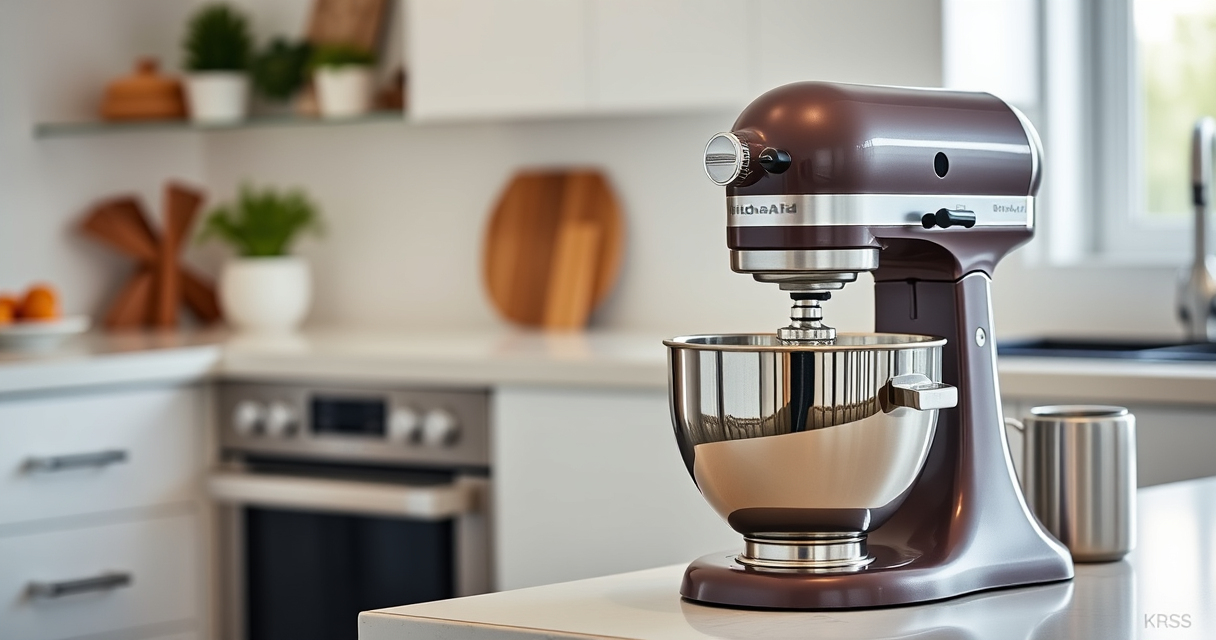

Owning a KitchenAid stand mixer brings incredible versatility to your kitchen, but like any appliance, it requires proper care and occasional troubleshooting to ensure optimal performance. This guide provides you with practical, step-by-step instructions to troubleshoot common issues, perform routine maintenance, and keep your mixer functioning like new in 2026.

Get baking supplies delivered free with Prime
- Fast, free delivery on millions of items
- Prime Video, Amazon Music and more included
- Member-only deals all year
From cleaning and inspecting parts to resolving motor or attachment problems, you’ll learn how to handle typical challenges safely and effectively. Plus, we highlight key tips to prolong your appliance’s lifespan and recommend a compatible accessory to enhance your baking and cooking experience.
Key Takeaways
| Regular Cleaning is Essential | Keep your mixer and attachments clean to prevent buildup and ensure smooth operation. |
| Troubleshoot Motor Issues Carefully | Check power connections and inspect for overheating or unusual noises. |
| Attachment Compatibility Matters | Ensure attachments are properly fitted and compatible with your mixer model. |
| Routine Maintenance Extends Lifespan | Lubricate moving parts and inspect for wear regularly. |
| Use Recommended Accessories | Enhance functionality with compatible attachments like the food grinder or pasta rollers. |
Preparing Your KitchenAid Mixer for Troubleshooting
- Unplug the mixer from the power source to prevent accidental activation and ensure safety during inspection or maintenance.
- Remove all attachments, including the Stainless Steel Flat Beater, to check for any visible damage or buildup.
- Inspect the power cord and plug for frays, cracks, or other damage. Do not attempt to use a damaged cord; replace it if necessary.
- Clean the attachment hub and surrounding area with a damp cloth to remove dust or debris that might interfere with attachment fitting.
Troubleshooting Common Mixer Problems
- Motor Not Running: Check that the mixer is properly plugged in and the power outlet is functional. Reset the circuit breaker if needed. If the motor still doesn’t start, inspect the on/off switch for damage.
- Uneven or Poor Mixing: Ensure the attachment is correctly aligned and securely fitted into the hub. Verify that the mixture isn’t overloaded or too thick for the selected attachment.
- Noisy Operation: Turn off the mixer and check for loose attachments or foreign objects stuck inside the gear housing. Lubricate moving parts if recommended by the manufacturer.
Maintaining Your Stainless Steel Flat Beater
The Stainless Steel Flat Beater (ASIN: B0GWH5HGS6) is designed for heavy-duty use and durability. To keep it in optimal condition:
- Remove the beater after each use and wash it in warm, soapy water. Since it is dishwasher safe, you can also clean it in the dishwasher for convenience.
- Inspect for any signs of bending, cracks, or excessive wear. Replace if any damage is found to prevent further issues.
- Dry thoroughly before storing or reattaching to avoid rust or corrosion, especially in humid environments.
- Occasionally check that the beater fits snugly onto the mixer’s drive shaft without wobbling.
Routine Maintenance Tips for Longevity
To extend the lifespan of your KitchenAid mixer:
- Lubricate the moving parts with a food-safe lubricant recommended by KitchenAid, especially the attachment hub and gear areas.
- Keep the mixer clean from dust, flour, and food debris by wiping down after each use.
- Periodically inspect electrical components for wear or damage and replace any faulty parts promptly.
- Store attachments in a dry, organized space to prevent damage and ensure quick access when needed.
Safety Tips and Warnings
Always unplug your mixer before performing any cleaning, troubleshooting, or maintenance tasks. Avoid using abrasive cleaners or steel wool on stainless steel parts to prevent scratches. Never attempt to repair electrical components unless qualified, as this poses a risk of electric shock. Keep the mixer and attachments out of reach of children when not in use. Follow the manufacturer’s instructions for all maintenance procedures to ensure safety and proper functioning.
The Products in This Guide

Stainless Steel Flat Beater
- ✔ Weight: Approx. 1.2 lbs
- ✔ Material: Stainless Steel
- ✔ Cleaning: Dishwasher safe

KitchenAid Stand Mixer Attachment
- ✔ Dimensions: 6 x 4 x 8 inches
- ✔ Weight: Approx. 3 lbs
- ✔ Warranty: Manufacturer’s warranty
Stainless Steel Flat Beater
The Stainless Steel Flat Beater is engineered for durability and seamless compatibility with KitchenAid 4.5-5 Qt tilt-head mixers. It resists bending and chipping, making it ideal for heavy-duty tasks like thick cookie dough and mashed potatoes.
Pros:
- Built for heavy-duty use
- Dishwasher safe for easy cleaning
- Perfect fit for popular KitchenAid series
- No paint chipping or coating issues
Cons:
- Requires careful inspection for damage over time
- Must be fitted correctly to avoid wobbling
- Not suitable for very small or delicate mixing tasks
Best for: Heavy-duty mixing, dough kneading, and mashing potatoes
Not ideal for: Light mixing tasks or very delicate recipes
Bottom line: A robust and reliable beater ideal for demanding baking tasks.
KitchenAid Stand Mixer Attachment
Enhance your KitchenAid mixer with the metal food grinder attachment. It’s perfect for processing fresh meats, vegetables, and even cheese, making your kitchen more versatile.
Pros:
- Compatible with all household KitchenAid mixers
- Includes multiple grinding plates and sausage tubes
- Large food tray for bigger batches
- Made of durable metal for long-lasting use
Cons:
- Requires pre-chilling for best results
- Cleaning can be a bit time-consuming
- Attachment is sold separately
Best for: Grinding meats, cheese, or vegetables at home
Not ideal for: For delicate or small-scale grinding tasks
Bottom line: A robust attachment that expands your mixer’s capabilities.
Frequently Asked Questions
How do I troubleshoot my KitchenAid mixer if it won’t start?
First, ensure the mixer is properly plugged in and the outlet is functioning. Check the on/off switch and circuit breaker. If it still doesn’t start, inspect the power cord for damage and replace if necessary. If problems persist, consult a qualified technician.
Why is my flat beater wobbling or not fitting properly?
Make sure the beater is correctly aligned and fully inserted into the attachment hub. Remove and reattach, ensuring it clicks into place. Inspect the drive shaft and beater for damage and replace if needed.
Can I put the Stainless Steel Flat Beater in the dishwasher?
Yes, the beater is dishwasher safe, making cleaning easy. However, hand drying is recommended to prevent any potential corrosion over time.
What should I do if my mixer makes unusual noises?
Turn off and unplug the mixer. Check for loose attachments or debris inside the gear housing. Lubricate moving parts if recommended and ensure all parts are securely fitted. If noise persists, have it inspected professionally.
How often should I perform maintenance on my KitchenAid mixer?
Regularly clean after each use, inspect parts monthly, and lubricate moving components every few months or as recommended by the manufacturer for optimal performance.
Keeping Your KitchenAid Mixer in Peak Condition
With proper troubleshooting, routine maintenance, and careful handling, your KitchenAid mixer can serve you reliably for years. Regular cleaning, inspection, and timely replacement of worn parts like the Stainless Steel Flat Beater ensure smooth operation and consistent results. Remember to follow safety guidelines and use compatible accessories to get the most out of your appliance in 2026 and beyond.
Affiliate disclosure: As an Amazon Associate we earn from qualifying purchases. Prices and availability are accurate as of the time of publishing.
Fall Picks
fall essentials
As an affiliate, we earn on qualifying purchases.